SourceMap Configuration
Sourcemap (source code mapping) is used to map minified code in production back to the original source code. RUM supports this source code file mapping: you zip the corresponding symbol table file and upload it, and the reported error measurement data will then be automatically transformed.
Zip Packaging Instructions
Zip the .map files generated by webpack obfuscation and minification of js files. Make sure that the file paths after unzipping the archive match the URL paths in error_stack. Assume the following error_stack:
ReferenceError
  at a.hideDetail @ http://localhost:8080/static/js/app.7fb548e3d065d1f48f74.js:1:1037
  at a.showDetail @ http://localhost:8080/static/js/app.7fb548e3d065d1f48f74.js:1:986
  at <anonymous> @ http://localhost:8080/static/js/app.7fb548e3d065d1f48f74.js:1:1174
The path to transform is /static/js/app.7fb548e3d065d1f48f74.js, and its corresponding sourcemap path is /static/js/app.7fb548e3d065d1f48f74.js.map. The directory structure after unzipping the archive is as follows:
The transformed error_stack_source:
The packaging method is basically the same as Web.
Android currently has two types of sourcemap files: one is the mapping file generated by R8/Proguard minification and obfuscation of Java bytecode, and the other is the (unstripped) .so file for C/C++ native code whose symbol tables and debug information were not removed during compilation. If your Android app contains both types of sourcemap files, package both into the zip archive. The directory structure after unzipping is similar to the following:
sourcemap.zip
├── mapping.txt
├── armeabi-v7a/
│   ├── libgameengine.so
│   ├── libothercode.so
│   └── libvideocodec.so
├── arm64-v8a/
│   ├── libgameengine.so
│   ├── libothercode.so
│   └── libvideocodec.so
├── x86/
│   ├── libgameengine.so
│   ├── libothercode.so
│   └── libvideocodec.so
└── x86_64/
    ├── libgameengine.so
    ├── libothercode.so
    └── libvideocodec.so
By default, the mapping file is located at: <project folder>/<Module>/build/outputs/mapping/<build-type>/. When the project is built with CMake, the .so files are located at: <project folder>/<Module>/build/intermediates/cmake/debug/obj/; when built with the NDK, they are located at: <project folder>/<Module>/build/intermediates/ndk/debug/obj/ (debug build) or <project folder>/<Module>/build/intermediates/ndk/release/obj/ (release build).
The transformation result is as follows:
Before transformation, error_stack:
java.lang.ArithmeticException: divide by zero
    at prof.wang.activity.TeamInvitationActivity.o0(Unknown Source:1)
    at prof.wang.activity.TeamInvitationActivity.k0(Unknown Source:0)
    at j9.f7.run(Unknown Source:0)
    at java.lang.Thread.run(Thread.java:1012)
After transformation, error_stack_source:
Before transformation, error_stack:
backtrace:
#00 pc 00000000000057fc  /data/app/~~Taci3mQyw7W7iWT7Jxo-ag==/com.ft-Q8m2flQFG1MbGImPiuAZmQ==/lib/arm64/libft_native_exp_lib.so (xc_test_call_4+12)
#01 pc 00000000000058a4  /data/app/~~Taci3mQyw7W7iWT7Jxo-ag==/com.ft-Q8m2flQFG1MbGImPiuAZmQ==/lib/arm64/libft_native_exp_lib.so (xc_test_call_3+8)
#02 pc 00000000000058b4  /data/app/~~Taci3mQyw7W7iWT7Jxo-ag==/com.ft-Q8m2flQFG1MbGImPiuAZmQ==/lib/arm64/libft_native_exp_lib.so (xc_test_call_2+12)
#03 pc 00000000000058c4  /data/app/~~Taci3mQyw7W7iWT7Jxo-ag==/com.ft-Q8m2flQFG1MbGImPiuAZmQ==/lib/arm64/libft_native_exp_lib.so (xc_test_call_1+12)
#04 pc 0000000000005938  /data/app/~~Taci3mQyw7W7iWT7Jxo-ag==/com.ft-Q8m2flQFG1MbGImPiuAZmQ==/lib/arm64/libft_native_exp_lib.so (xc_test_crash+112)
...
After transformation, error_stack_source:
backtrace:

Abort message: 'abort message for ftNative internal testing'
#00 0x00000000000057fc /data/app/~~Taci3mQyw7W7iWT7Jxo-ag==/com.ft-Q8m2flQFG1MbGImPiuAZmQ==/lib/arm64/libft_native_exp_lib.so (xc_test_call_4+12)
xc_test_call_4
/Users/Brandon/Documents/workplace/working/StudioPlace/xCrash/xcrash_lib/src/main/cpp/xcrash/xc_test.c:65:9
#01 0x00000000000058a4 /data/app/~~Taci3mQyw7W7iWT7Jxo-ag==/com.ft-Q8m2flQFG1MbGImPiuAZmQ==/lib/arm64/libft_native_exp_lib.so (xc_test_call_3+8)
xc_test_call_3
/Users/Brandon/Documents/workplace/working/StudioPlace/xCrash/xcrash_lib/src/main/cpp/xcrash/xc_test.c:73:13
#02 0x00000000000058b4 /data/app/~~Taci3mQyw7W7iWT7Jxo-ag==/com.ft-Q8m2flQFG1MbGImPiuAZmQ==/lib/arm64/libft_native_exp_lib.so (xc_test_call_2+12)
xc_test_call_2
/Users/Brandon/Documents/workplace/working/StudioPlace/xCrash/xcrash_lib/src/main/cpp/xcrash/xc_test.c:79:13
#03 0x00000000000058c4 /data/app/~~Taci3mQyw7W7iWT7Jxo-ag==/com.ft-Q8m2flQFG1MbGImPiuAZmQ==/lib/arm64/libft_native_exp_lib.so (xc_test_call_1+12)
xc_test_call_1
/Users/Brandon/Documents/workplace/working/StudioPlace/xCrash/xcrash_lib/src/main/cpp/xcrash/xc_test.c:85:13
#04 0x0000000000005938 /data/app/~~Taci3mQyw7W7iWT7Jxo-ag==/com.ft-Q8m2flQFG1MbGImPiuAZmQ==/lib/arm64/libft_native_exp_lib.so (xc_test_crash+112)
xc_test_crash
/Users/Brandon/Documents/workplace/working/StudioPlace/xCrash/xcrash_lib/src/main/cpp/xcrash/xc_test.c:126:9
...
On iOS, the sourcemap file is a .dSYM symbol table file with the .dSYM suffix that contains debug information. In general, after compilation it is in the same directory as the .app file, as shown below:
$ ls -l Build/Products/Debug-iphonesimulator/
total 0
drwxr-xr-x   6 zy  staff  192  8  9 15:27 Fishing.app
drwxr-xr-x   3 zy  staff   96  8  9 14:02 Fishing.app.dSYM
drwxr-xr-x  15 zy  staff  480  8  9 15:27 Fishing.doccarchive
drwxr-xr-x   6 zy  staff  192  8  9 13:55 Fishing.swiftmodule
Note that XCode Release builds generate .dSYM files by default, while Debug builds do not. You need to configure XCode accordingly:
Build Settings -> Code Generation -> Generate Debug Symbols -> Yes
Build Settings -> Build Option -> Debug Information Format -> DWARF with dSYM File
When creating the zip archive, simply package the corresponding .dSYM files into it. If your project involves multiple .dSYM files, package them all together into the zip archive. The directory structure after unzipping is similar to the following (a .dSYM file is essentially a directory, similar to the executable .app file on macOS):
React Native sourcemap files include the native iOS, Android, and js parts—three source maps in total.
For how to obtain the native iOS and Android sourcemap files, refer to the acquisition method in the corresponding packaging instructions.
The js sourcemap can be obtained as follows:
Android source maps are enabled by default. The source map file is located at android/app/build/generated/sourcemaps/react/release/index.android.bundle.map
iOS requires some extra configuration to enable source map generation. Open Xcode and edit the "Bundle React Native code and images" build phase. Above the other export entries, add a SOURCEMAP_FILE entry with the desired output path.
With Hermes, React Native <0.71
set -e
#  output source maps
export SOURCEMAP_FILE="./main.jsbundle.map";
# React Native 0.70,you need to set USE_HERMES to true if Hermes is used, otherwise the source maps won't be generated.
export USE_HERMES=true
# keep the rest of the script unchanged
# When React Native (0.69,0.71) and using Hermes
# add these lines to compose the packager and compiler source maps into one file
REACT_NATIVE_DIR=../node_modules/react-native
if [ -f "$REACT_NATIVE_DIR/scripts/find-node-for-xcode.sh" ]; then
source "$REACT_NATIVE_DIR/scripts/find-node-for-xcode.sh"
else
# Before RN 0.70, the script was named find-node.sh
source "$REACT_NATIVE_DIR/scripts/find-node.sh"
fi
source "$REACT_NATIVE_DIR/scripts/node-binary.sh"
"$NODE_BINARY" "$REACT_NATIVE_DIR/scripts/compose-source-maps.js" "$CONFIGURATION_BUILD_DIR/main.jsbundle.map" "$CONFIGURATION_BUILD_DIR/$UNLOCALIZED_RESOURCES_FOLDER_PATH/main.jsbundle.map" -o "../$SOURCEMAP_FILE"
After obtaining the js sourcemap file, package it into a zip archive together with the native sourcemap for the corresponding build platform, using the following format:
You can use source map visualization tools such as source-map-visualization to verify file usability.
Upload Methods
Three SourceMap upload methods are currently supported:
- Console upload: suitable for manually uploading and deleting SourceMap files;
- Script upload: suitable for automated uploads in public DataWay scenarios;
- Build-stage plugin upload: suitable for automatically uploading SourceMap during the packaging stage of Web projects.
Console Upload and Deletion
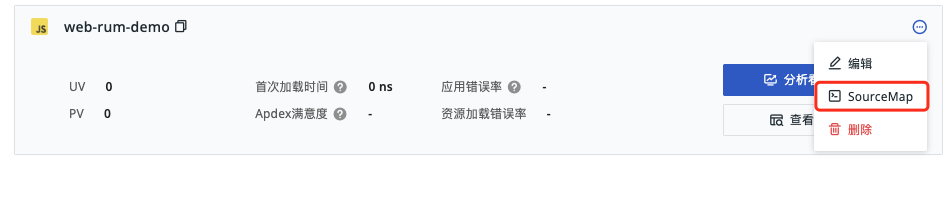
After configuration and packaging are complete, go to the console and navigate to [RUM] > [Application List] > [Click the More icon at the upper-right corner of the app] > [SourceMap] to upload or delete files. Make sure your current account has at least "Edit" permission.
Uploads and deletions must be performed within the workspace the app belongs to, and only the current workspace should be selected. These configuration entries are not available in the read-only cross-workspace state. For details, see Cross-Workspace Query.

Below the 🔍 bar, you can view the uploaded file names and app types. You can enter a file name to search; click to delete the current file.
Upload Notes:
- The file size must not exceed 500M;
- The file format must be
.zip; - Make sure that the file paths after unzipping the archive match the URL paths in
error_stack; - Multiple files cannot be uploaded at the same time;
- Uploading a file with the same name will prompt an overwrite warning; please be aware.
Script Upload
If the current app uses the public DataWay access method, you can also use a script to upload the packaged sourcemap.zip file through OpenAPI.
For more details, see Script Upload of SourceMap.
Build-Stage Plugin Upload
For Web projects, in addition to console upload and script upload, you can also automatically upload SourceMap files via plugins during the project build stage.
The following methods are currently supported:
Once the SourceMap is uploaded, it can be used to parse error stacks.