Databases
The database display covers various infrastructure database data that DataKit supports for collection. Through a centralized explorer, it monitors key metrics of databases such as MySQL, SQL Server, PostgreSQL, and Oracle in real time, including version, uptime, load trend, and blocking rate.
Note
The DataKit collector has been updated. Please contact the administrator to upgrade the version to enable the new database monitoring experience.
Data Display
The database explorer provides multiple professional analysis views based on lists and charts.
Displays the latest metric data of the corresponding database in the current workspace, including database address, instance name, database type, version, uptime, QPS, load trend, blocking rate, etc.
Displays data in the form of top lists, pie charts, treemaps, and grouped tables, based on operations such as count, last, first, count_distinct, and filtered by the by condition.
Data List
The database list page displays the core status of each instance in card-style rows. The corresponding type icon is displayed before the database address for quick identification of database types such as MySQL, PostgreSQL, Oracle, SQL Server, and MongoDB.
The list fields are described as follows:
| Field | Description |
|---|---|
| Database Address | The connection address of the database instance, fully displayed in the details page without width limitation. |
| Instance Name | The identifier of the database instance. |
| Type | The database type, e.g., MySQL, PostgreSQL, etc. |
| Version | The version number of the database. |
| Uptime | The running time of the instance. |
| QPS | Queries per second, including the current value and a trend thumbnail. |
| Load Trend | The distribution trend of session load aggregated by wait type. |
| Blocking Rate | The percentage of current database blocking conditions. |
Time Widget
At the top right of the explorer, you can select data for different time ranges, including:
- Last 2 hours
- Last 6 hours
- Last 1 day
- Last 2 days
Data Details
Clicking a single piece of data in the database explorer will slide out the corresponding details page. You can view the overview, queries, sessions, metrics, logs, custom related views, and other scattered data of that piece of data, avoiding repeated jumps.
Overview
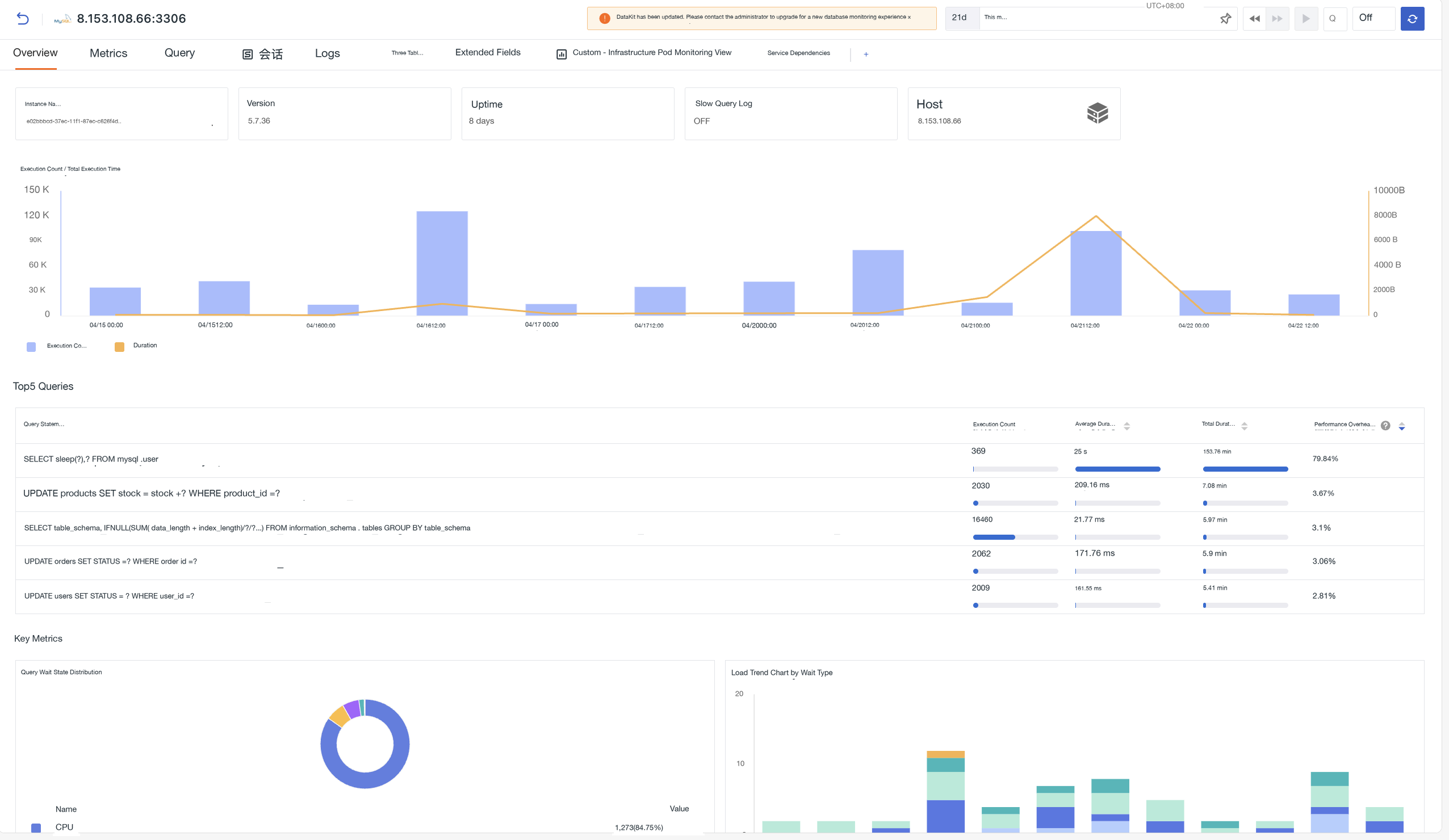
The overview page displays the core running status of the database instance. The top of the page shows the instance name, version, uptime, slow query log status, and host information, helping you quickly locate the infrastructure resources where the database instance resides.
Execution Count / Total Execution Time
The left Y-axis shows the total number of executions of all queries within the time interval as a bar chart, and the right Y-axis shows the total time of all queries within the time interval as a line chart.
Top 5 Queries
Displays the top queries sorted by total time, including the query statement, execution count, average time, total time, and performance overhead percentage. Click any query to enter the Query overview for details.
- Default sorted by total time in descending order.
- Click any row to enter the Query overview slide-out page.
Key Metrics
1. Query Wait State Distribution
Displays the distribution of wait events for current database sessions in a ring chart, aggregated by wait state dimension.
2. Load Trend Chart by Wait Type / Database / User
A bar chart showing the load distribution of the database by wait type / database / user dimensions, intuitively presenting the proportion changes of various load types such as Idle, CPU, Application, and System I/O.
3. Key Resource Metrics
Displays the core resource consumption trends of the node where the database resides, including:
- CPU: CPU usage, CPU load
- Disk: Disk read/write time, bytes read/written per second, IOPS, disk usage
- Network: Network traffic/sec, network packets/sec
- Memory: Memory usage, memory consumption
Metrics
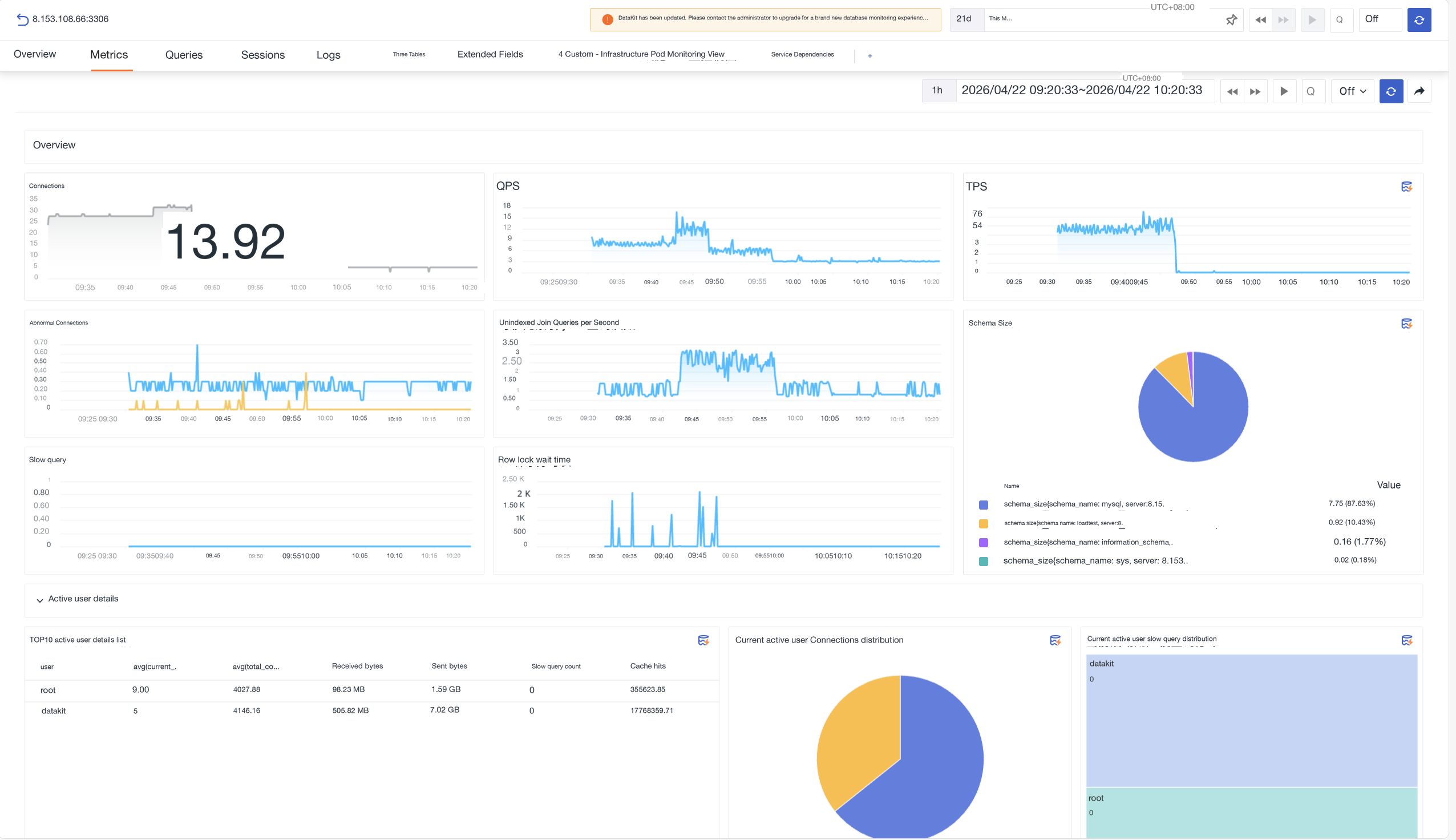
Displays the full performance metrics of the database in a visual chart format, including sessions, response time, cache hit rate, tablespace usage, PGA memory, and other core metrics.
Queries
Focuses on SQL performance analysis to help locate slow queries and performance bottlenecks.
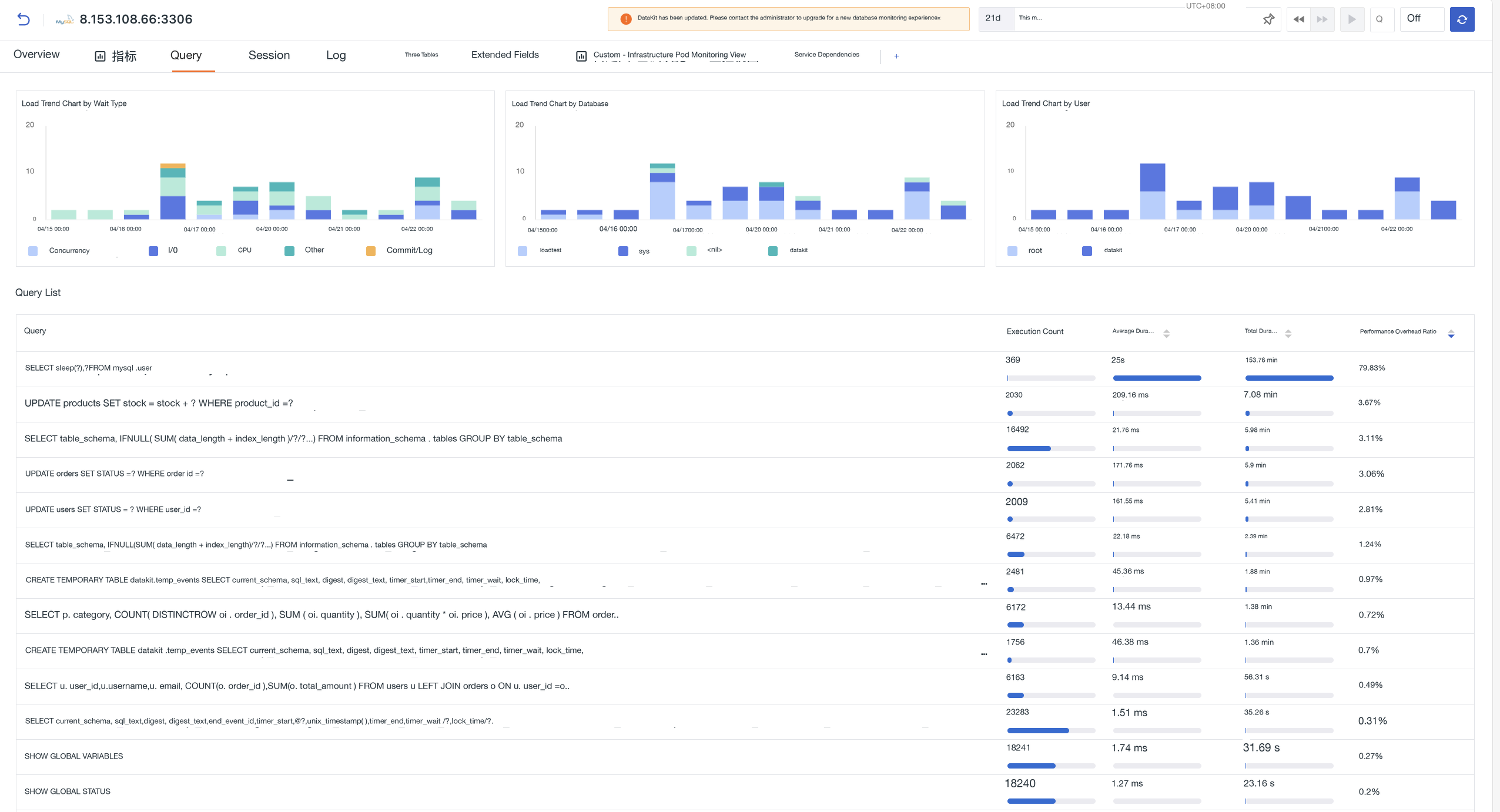
The top shows load trend charts aggregated by wait type, database, and user. Below is a query list showing the execution count, average time, total time, and performance overhead percentage of each SQL statement, supporting sorting by each dimension.
- Click any query to enter the query overview slide-out page to view the SQL statement, performance trend chart, and sampling records.
- Click a sampling record to drill down to the query details page to view the complete log data of that sample.
- In the upper right corner of the SQL statement area, click AI Optimization Suggestions to invoke the TOBY AI TruePilot slide-out panel, which automatically performs optimization analysis for that query.

Sessions
Focuses on connection sessions, lock waits, and blocking analysis to help diagnose concurrency conflicts.
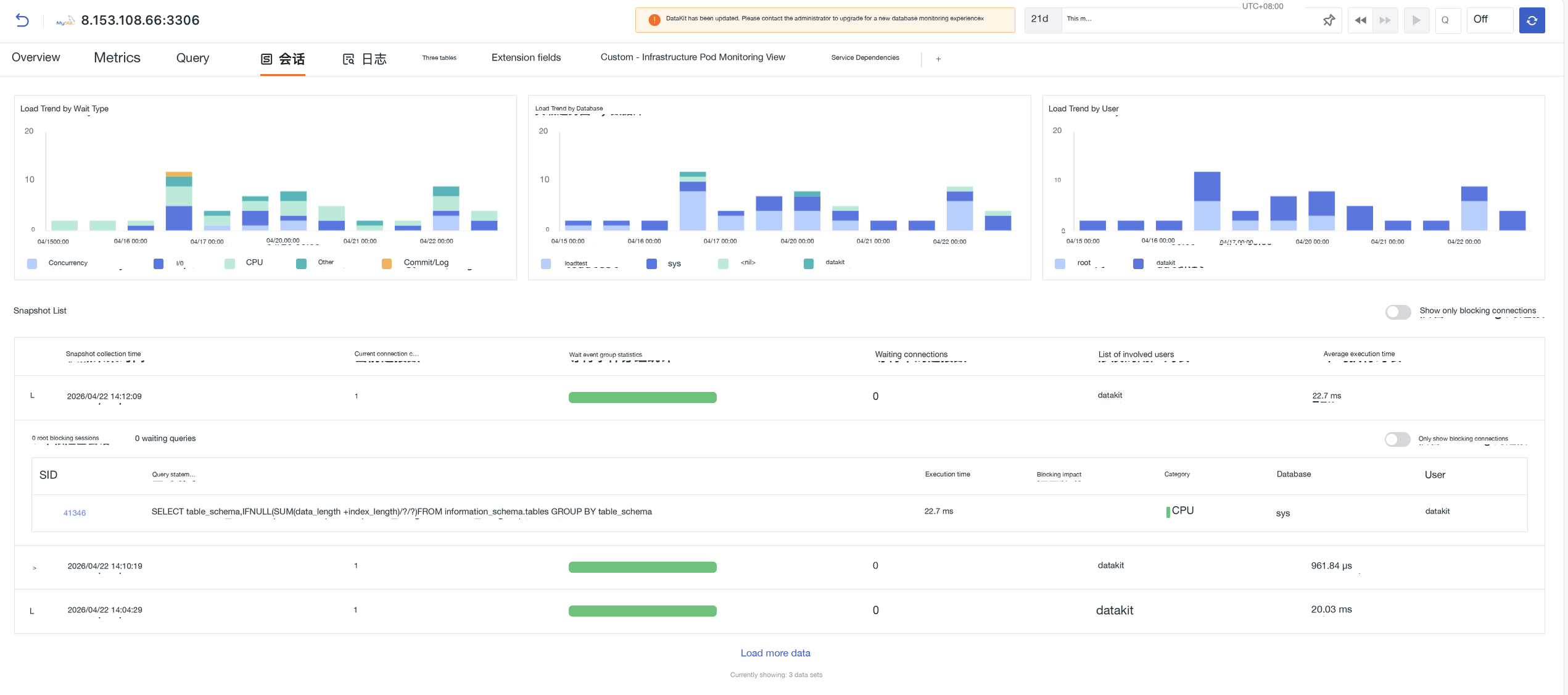
- The top shows load trend charts aggregated by wait type, database, and user. The vertical axis represents the number of active sessions at the corresponding time point.
-
Below is a snapshot list, aggregated by collection time point, showing session data including current connections, wait event distribution, number of waiting connections, involved users, and average execution time.
- Click a snapshot to expand and view details, including a summary of root blocking sessions and waiting query counts, as well as a session detail list.
- Provides a filter switch "Show only blocking connections":
- Top right of the snapshot list: globally filter snapshots with blocking activity.
- Top right of the expanded snapshot details: only show blocking-related sessions in the current snapshot.
Click the query statement in the session list to drill down and view detailed SQL performance data.
Logs
View database-related log data, including slow query logs, error logs, etc.
Tables
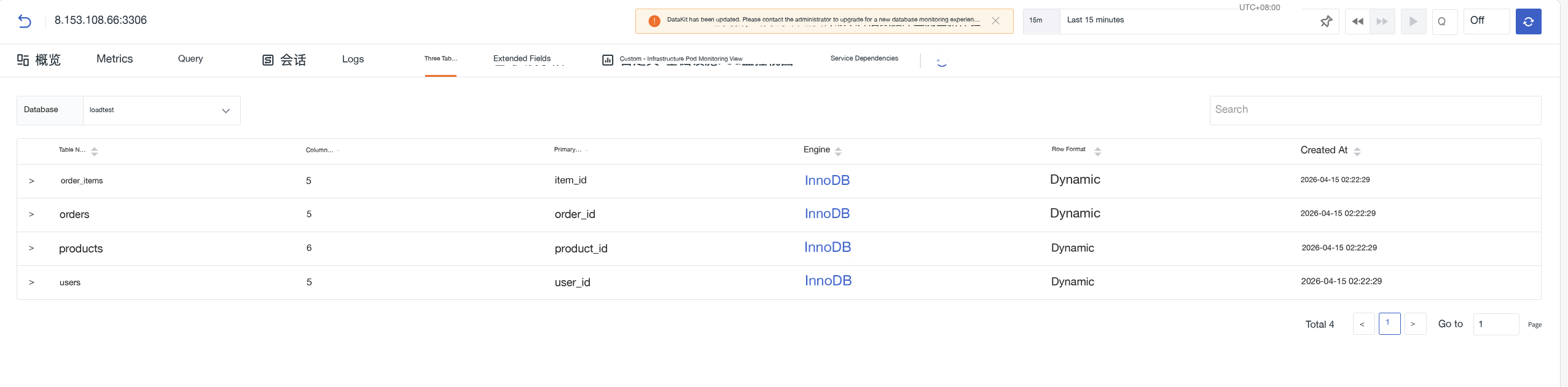
View database table structure information. Use the Database dropdown to switch the target database, or search for a table name in the search box.
The list shows all tables in the current database, including table name, number of columns, primary key, engine, row format, and creation time. Click a table name to expand and view the field structure details of that table.
Extension Fields
Displays the complete metadata of the instance in key-value pairs, supporting searching by field name or value.
Custom Views
Uniformly collects user-defined views, supporting the addition of new views.